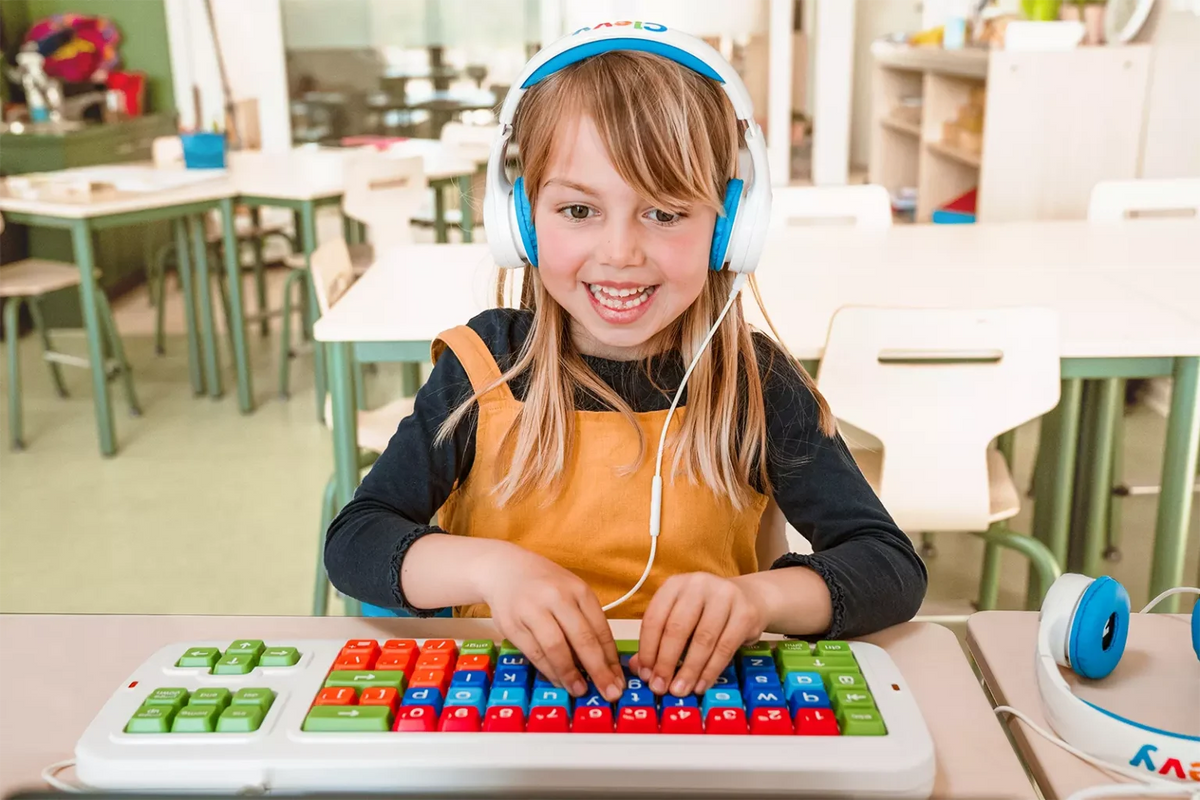
The Clevy Keyboard is a durable mechanical keyboard with large, easy-to-press keys, designed to support individuals with special needs. It supports learning to type, read, and use computers, while promoting digital accessibility for people with disabilities. This version is the Tri-Mode, which means it includes wired and wireless connection in one.
New version, new features
Other than updated connectivity, we have included other new features in this version:
- Up to date 5.3 Bluetooth connectivity
- Optional ABCDE layout
- Improved RGB LEDs
- Extra features (e.g., media keys, input detection)
- Customizable firmware
This version took nearly three years to develop. During that time, we talked with teachers, therapists, assistive technology specialists, parents, and users with very different ways of interacting with technology. We looked closely at what helped, where frustration appeared, and what could make learning and communication easier.
The result is familiar on the outside and entirely new on the inside. It is still a Clevy Keyboard, just more capable, more flexible, and longer lasting.
Why a New Version
The Clevy Keyboard 2 existed in three different versions: USB, Bluetooth, and SimplyWorks. Over time, the Bluetooth module reached end of life. It could not simply be swapped on the existing PCB. That pushed us to rethink the design.
At the same time, having three separate models caused confusion. Schools and resellers had to choose which connection version to store. Therapists had to decide which one to recommend. Users sometimes ended up with a keyboard that worked in one environment but not another.
We paused and asked a bigger question: What if one keyboard could do everything? Not three models. Just one.
Triple Connectivity - Tri Mode
The Clevy Keyboard 3 is built to support Bluetooth, USB C, and SimplyWorks RF in one device. At launch, Bluetooth and USB C are fully enabled. SimplyWorks RF will be added through a firmware update. The hardware for SimplyWorks is already inside the keyboard; the code will come later.
This approach avoids production delays and allows users to begin using the keyboard now, while also preparing for assisted access environments.
We offer more than thirty language layouts and colour combinations. Instead of three versions of each layout, there is now only one. This reduces stock complexity, minimum order requirements, and frustration for both users and resellers.
Why it matters
No one has to guess which model is correct. One keyboard works everywhere: wired, wireless, and in assistive receiver systems. This saves time, simplifies setup, and makes support easier.
SimplyWorks Support - Built for the Future
SimplyWorks is a wireless assistive technology system created by Pretorian Technologies. It allows keyboards, switches, and joysticks to connect through one receiver, commonly used in special education and therapy environments.
Clevy Keyboard 3 will join this ecosystem. When the firmware is ready, SimplyWorks mode will be activated through a firmware update. The keyboard you buy today is already ready for it.
Why it matters
Schools and clinics do not need new hardware to stay compatible. Users continue with the setups they already know.
What Has Changed from Version 2 to Version 3
On the outside, the Clevy Keyboard 3 looks very similar to the previous version. The size, spacing, and feel remain the same. Keycaps are fully interchangeable between versions, so nothing new needs to be learned.
Inside, nearly everything has changed. A completely new PCB. Updated wireless components. Additional firmware capabilities. A redesigned LED system. Adjusted moulds to support the new port, switch, and internal structure. The keyboard effectively has a new brain.
Why it matters
Users benefit from better performance and more flexibility while keeping the familiar tactile experience that makes Clevy keyboards approachable.
Switching Connections is Simple
On the back of the keyboard is a hardware Wireless Mode switch. It selects:
-
- Bluetooth
- SimplyWorks (via firmware update)
- or Wireless Off

Wireless Off disables wireless completely. If a USB C cable is connected, the keyboard works as a wired keyboard. Being able to truly turn the keyboard off was not possible in previous generations.
There is also an easy to access pairing button directly below the switch.
The keyboard uses two AA batteries. These are intentionally not charged inside the keyboard. Charging AA cells inside would not pass CE testing. Users who prefer rechargeability can use rechargeable AA batteries and charge them externally.
Why it matters
The controls are clear and physical. No menus. No confusion. And full power off means reliability and long battery life.
Keyguards and Covers Updated for USB-C

Many learners and users rely on the Clevy Keyguard or Clevy Cover as part of their daily access routine. These accessories provide finger guidance for users with tremors or motor planning challenges, prevent accidental key presses, support hand stability, and reduce sensory overload. For others, the soft Cover provides comfort and extra spill protection.
With the Clevy Keyboard 3, we introduced a USB-C port on the back of the keyboard. The previous Keyguard 2 and Cover 2 designs would have covered that port, making it difficult to use the keyboard while the accessory was installed. Rather than expecting users to remove accessories or adjust their setup, we adjusted the moulds and designed Keyguard 3 and Cover 3 with a larger rear cutout.
Why it matters
Users who rely on these supports never have to change how they position their hands or how they work. The keyboard adapts to the user. Not the other way around.
New Features and Upgrades
Flashable Firmware
For the first time in a Clevy keyboard, the firmware can be updated. This means the keyboard can receive new features, compatibility improvements, and refinements simply by running a small update tool. No replacement hardware required.
Why it matters
A keyboard purchased today can keep improving over time. Schools, clinics, and families do not need to wait years for a “new model” to gain features. The keyboard can grow alongside the user.

RGB LED System
The indicator lights are no longer basic status lamps. The Clevy Keyboard 3 uses a multi-purpose RGB LED system that shows connection mode, battery level, and optional input feedback. Users can also cycle through brightness levels, including fully off.
Why it matters
Users can see what mode the keyboard is in without guessing or asking for help. This is especially helpful for shared environments where the keyboard may move between computers, tablets, or assistive setups.

Input Detection
When enabled, one of the LEDs will blink briefly each time a key is pressed. This feature is particularly valuable for users who have reduced tactile sensation, tremor, or difficulty judging whether they pressed a key with enough force.
Why it matters
For some users, not knowing whether a key was pressed (for example due to reduced dexterity) creates hesitation and frustration. The visual cue removes uncertainty and restores confidence and control.
Expanded Shortcut Controls
The Clevy Keyboard 3 includes new shortcut tools that let users access additional functions without adding more keys. These include function key access, multimedia controls, a Windows key lock, and a complete factory reset option. All shortcuts are documented in the digital manual, which is kept up to date.
Why it matters
The keyboard stays simple and clear but now offers more control. Users who asked for function keys, volume control, or the ability to prevent accidental app switching now have those options.
Accessibility First: Designed for Every Learner

ABCDE Alphabetical Layout
Traditional layouts like QWERTY are designed for speed, not learning. For emerging readers, young learners, users with dyslexia, or those developing new motor patterns, alphabetical order can be easier to understand. With the Clevy Keyboard 3, users can toggle the layout mode and physically rearrange the keycaps to ABCDE order.
Why it matters
Supports early literacy and intuitive learning without forcing QWERTY before the user is ready. This function also offers an alternative with users with learning disabilities who would feel more comfortable using a known setup such as the alphabet rather than the more complicated layouts.

Sticky Keys, Now User Controlled
Sticky Keys helps users who cannot press two keys at the same time. Previously, on the Bluetooth version of the Clevy Keyboard 2, Sticky Keys was always active, which led to confusion. In the Clevy Keyboard 3, Sticky Keys can be turned on or off at any time with a shortcut, and LED feedback confirms the state.
Why it matters
Users have control. When they need Sticky Keys, it is there. When they do not, it stays out of the way. The keyboard adapts to abilities and preferences rather than forcing one workflow.
Behind the Scenes: Fun Facts from the development team.
This keyboard looks simple. The process was not. Here are a few things you would never notice unless we told you:
- The LED behaviour took a surprising amount of work. How long should the LED blink. Which colour is the most helpful. Which side. How bright. How often. And how to do all of this without draining the battery. It took a full week to get it to a point that felt right.
- We replaced the wireless mode switch three times because it did not look visually aligned with the keyboard body. Small detail. Big difference in how the keyboard feels.
- The USB C power socket is a sensitive part. We changed the mould design three times to make sure the port is strong, stable, and comfortable to access. It had to feel right and last for years.
- Our first user manual became so large that printing it was simply not realistic anymore. And we did not want to produce waste. So we switched to a digital manual, which also allowed adjustable font size and contrast. In the end, this turned out to be the better approach.
- The alphabetical layout feature took a long time to figure out. In the end, we solved it entirely through firmware, not software. That moment was a very satisfying one.
- Changing to USB C meant changing the packaging. So the packaging became its own project. Packaging is always a product in itself.
- The battery decision took the longest. We wanted to keep the keyboard affordable and keep the design safe and CE compliant. Sticking with AA batteries was the best choice.
- The biggest relief was when we realised that, with firmware updates, we no longer need to wait many years for a new model to introduce improvements. If you have ideas, we can now actually build on them.
- And right before the first shipment, we discovered the key repeat function was not working correctly. We stopped production immediately, fixed it, and only continued once it worked. Shipping late is better than shipping wrong.
Conclusion
The Clevy Keyboard 3 brings together everything we learned from the previous version and everything users asked us to improve. It keeps what worked, strengthens what needed to be easier, and adds room to grow.
It works in classrooms, therapy rooms, clinical environments, offices, and homes. It supports learning, communication, and independence.
And it continues to evolve with firmware updates.
We cannot wait to see how you use it.